Appendix A — Python Fundamentals
The Python you need before the rest of this book makes sense. This assumes no prior programming experience and stays inside the core language — no libraries. Those come in Appendix B.
Every example uses text, because in this book text is the data.
Every Python cell runs in your browser. Nothing to install, nothing sent to a server. The first cell you run takes fifteen to thirty seconds while Python downloads; after that each cell is instant.
Edit any cell and run it again. Breaking things on purpose is the fastest way to learn what a rule actually means.
A.1 Data types and printing
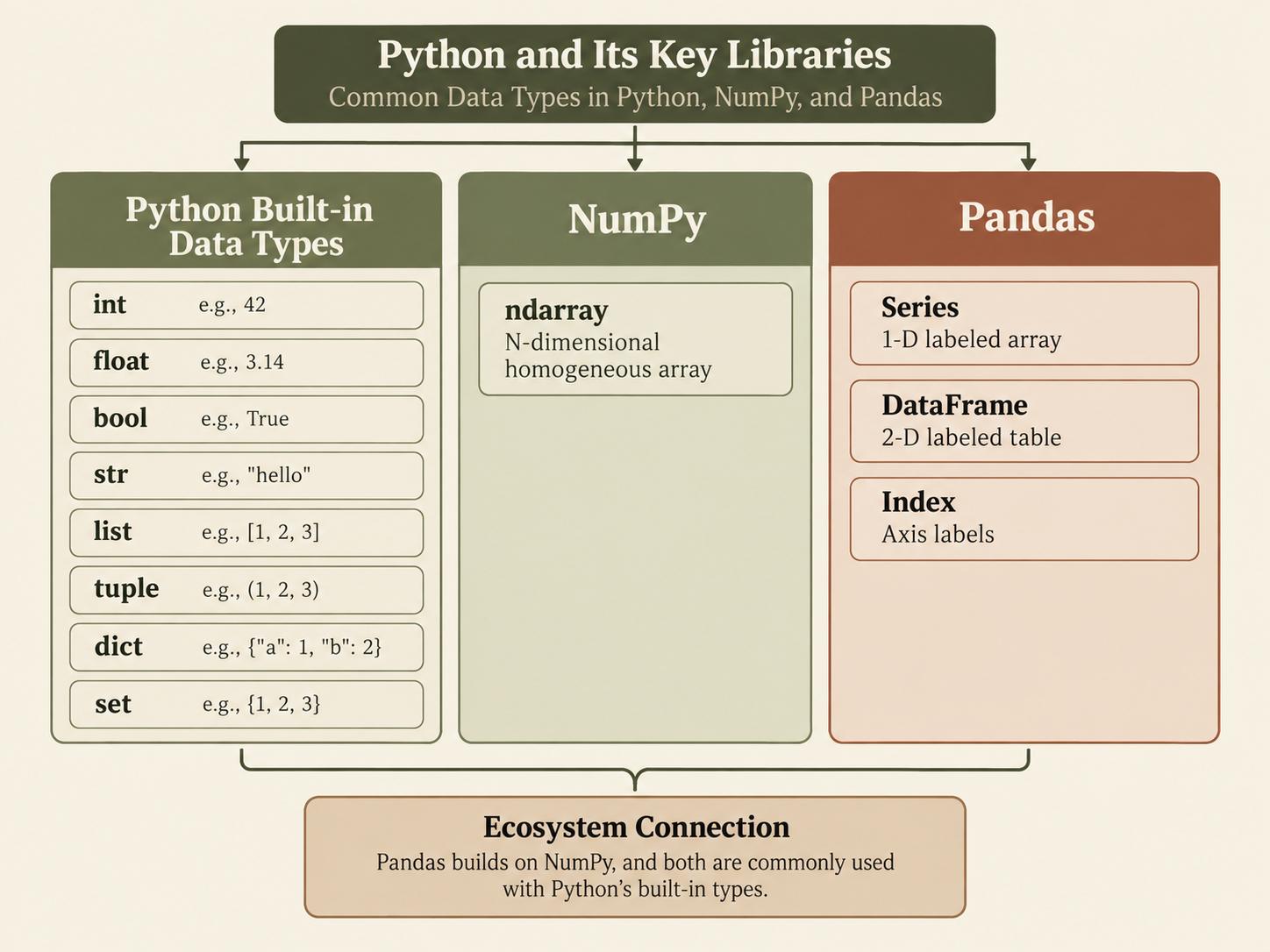
Python data types describe the kind of information a variable stores. For example, an integer (int) stores whole numbers such as 5, a float (float) stores decimal numbers such as 3.14, a string (str) stores text such as "Hello", and a Boolean (bool) stores either True or False. Python also has types for storing collections of values, such as lists (list), which can hold several items together. Knowing the data type helps you understand what operations you can perform on a value.
Keeping track of data types is important because different kinds of data behave differently. For example, adding two numbers performs arithmetic, while adding two strings joins text together. In many programming languages, such as C++ or Java, you usually declare the type of a variable explicitly before using it. Python is more flexible: it automatically determines the type from the value you assign. For example, x = 5 makes x an integer, while x = "hello" makes it a string. This makes Python easier to start with, but programmers still need to pay attention to types to avoid errors and unexpected results.
A.1.1 Integers
An integer (int) is a whole number. Python handles integers of any size.
How the code works:
- Assigning a whole number to a name makes it an
int. print()accepts several values separated by commas and puts a space between them.type()reports what kind of value something is — your first debugging tool.
A.1.2 Floats
A float (float) is a number with a decimal point.
How the code works:
- Any number written with a decimal point is a
float. /always produces a float.//divides and discards the remainder, keeping anint— useful when you need a whole number of rows.- Floats are stored approximately. Try
0.1 + 0.2and look closely at the result; this surprises everyone once.
A.1.3 Strings
A string (str) is a data type used to store text, such as words, sentences, or entire documents. In Python, strings are written inside quotation marks, for example "Hello" or "The patient reports chest pain." Strings are especially important in Natural Language Processing (NLP) because human language usually begins as text. Before a computer can analyze language, classify documents, or make predictions from text, the original strings must be processed and converted into numerical representations that machine-learning models can work with.
Python already provides useful built-in string methods for tasks such as changing capitalization, splitting text, searching for words, and replacing characters. NLP libraries such as NLTK, spaCy, and Hugging Face Transformers build on these basic capabilities by providing more advanced tools for working with language. They can tokenize text into words or subwords, identify parts of speech, reduce words to their base forms, recognize names and other entities, and convert text into numerical representations that can be used by machine-learning models.
How the code works:
'...'and"..."are interchangeable. Use whichever avoids escaping.len()counts characters, including spaces.isinstance(value, type)asks whether a value is of a given type. Prefer it totype(x) == str.
A.1.3.1 Asking a string what it contains
A string method is a function attached to a string, called with a dot: text.method(). One family of them asks a yes-or-no question about the characters in the string. These are the ones that decide, later in this appendix, which pieces of a pathology report count as words and which are measurements.
How the code works:
- Each one returns a Boolean, so it can go straight into an
ifor into the filter of a list comprehension. - They apply to every character. One stray comma, space or digit makes
.isalpha()false, which is why"carcinoma,"fails. - The empty string is
Falsefor all of them. There is no character to satisfy the test.
The case methods answer a similar question:
Python offers .isdigit(), .isdecimal() and .isnumeric(). On ordinary ASCII digits they agree; they part company on unusual characters.
.isdecimal() is the strict one: characters you could feed to int(). .isdigit() also accepts superscripts, and .isnumeric() accepts anything with a numeric value at all, including fractions and Roman numerals. Pathology text contains all of these — "pT2", "3 cm²", "½ of the specimen" — so the choice matters.
None of the three accepts a decimal point or a minus sign, so "2.4" and "-3" are False for all of them even though both are perfectly good numbers. Testing whether text is a number rather than a run of digits means trying to convert it and catching the failure, which is Section A.6.
Methods that change a string rather than ask about it — .lower(), .strip(), .split(), .join() — are gathered in Section A.5, where they do real work.
A.1.4 Booleans
A Boolean (bool) is either True or False. Comparisons produce them, and they are what decides every if statement and every row of a filter.
How the code works:
TrueandFalseare capitalised. Lowercasetrueis aNameError.- Any comparison —
>,==,in— evaluates to a Boolean. Truebehaves as1andFalseas0, sosum()over a list of Booleans counts the True ones. This is exactly how you will count matching rows later.
A.1.5 Types behave differently
The same operator can mean two different things depending on the types involved.
How the code works:
+adds numbers but concatenates strings."2" + "3"is"23", not5.- Python refuses to mix them rather than guessing what you meant.
str(),int()andfloat()convert between types. Reading a number from text always needsint()orfloat().
A.1.6 f-strings
An f-string puts values inside text. Put f before the quote and names inside {}.
How the code works:
- Anything inside
{}is evaluated, so arithmetic works:{count / total * 100}. :.1fis a format specifier — one digit after the decimal point. Without it you would get5.513997689803634%.
Change :.1f to :.3f, then to :.0f. Change count to 21 (the rarest class, CHOL) and run it again.
A.2 Lists, tuples, dictionaries, and sets
Python also provides several common data types for storing collections of information: lists, tuples, dictionaries, and sets. In NLP, a list might store the words or tokens in a sentence in their original order, while a tuple can store a fixed group of related values, such as a word together with its part-of-speech tag. A dictionary stores information as key-value pairs and is useful for tasks such as mapping words to counts, labels, or numerical IDs. A set stores unique values only, making it useful for keeping track of distinct words in a document or removing duplicates. All four are widely used in NLP, but they differ in structure: lists are ordered and changeable, tuples are ordered but fixed, dictionaries organize data by keys, and sets focus on uniqueness rather than order.
A.2.1 Lists
A list is an ordered, changeable sequence in square brackets.
How the code works:
- Counting starts at 0, so
reports[0]is the first item. - Negative indices count from the end:
-1is last,-2second to last.
A.2.2 Slicing
A slice takes a range of items. The start is included, the stop is not.
How the code works:
codes[0:3]gives indices 0, 1, 2 — not 3. This “stop is excluded” rule is the single most common off-by-one mistake in Python.- Omitting a number means “from the beginning” or “to the end”.
- A third number is the step.
[::2]takes every second item.
A.2.3 List methods
A.2.4 List comprehensions
A list comprehension builds a list in one line. This is not a stylistic nicety — it is the ordinary way to tokenize a document.
How the code works:
- Read it aloud: “
w.lower()for eachwinwords.” - The optional
ifat the end keeps only the items that pass. Here it drops"3", because.isalpha()is false for a string of digits. .lower()returns a lowercased copy;wordsitself is untouched. The rest of the string methods are in Section A.5.
A.2.5 Tuples
A tuple is an ordered sequence that cannot be changed. Parentheses instead of brackets.
How the code works:
- Unpacking assigns several names at once. You will see this constantly, because
df.shapereturns a tuple. - Tuples are immutable; assigning into one raises
TypeError.
A.2.6 Dictionaries
A dictionary maps keys to values. This is how you store a lookup table.
How the code works:
d[key]raisesKeyErrorif the key is missing.d.get(key, default)does not.intests keys, not values.
A.2.7 Building and inverting dictionaries
Two patterns you will meet constantly in NLP code.
How the code works:
zipwalks two lists in step, producing pairs..items()yields(key, value)pairs, so{value: key for key, value in ...}reverses the direction of the lookup. A vectorizer gives you a word-to-column mapping; flipping it is how you get from a model’s weights back to the words they belong to.
A.2.8 Sets
A set is an unordered collection with no duplicates. This is how you count a vocabulary.
Checking x in some_list looks at every item until it finds a match. Checking x in some_set jumps straight to the answer.
With a handful of items you will never notice. With thousands you will wait. Splitting a corpus of 9,500 documents by checking each one against a held-out list of 2,900 is roughly 13 million comparisons — a set would make it almost instant.
A.3 Control flow
A.3.1 if, elif, else
How the code works:
- The colon and the indentation are part of the syntax, not decoration.
- Conditions are tested top to bottom; the first true branch runs and the rest are skipped.
A.3.2 Comparison and logical operators
How the code works:
=assigns,==compares. Confusing them is the classic beginner bug.and,or,notcombine conditions.intests membership — in a string it means “is this a substring”.
A.3.3 Loops
How the code works:
for x in things:visits each item in turn.enumerateyields(index, item)pairs — use it instead of tracking a counter.range(3)produces 0, 1, 2. Again, the stop value is excluded.
A.3.4 Counting with a loop
This is worth writing once by hand. Appendix B replaces the whole block with .value_counts(), and you will appreciate it more having done it the long way.
A.4 Functions
A.4.1 Defining and calling
How the code works:
defstarts a definition; the indented body is the function.- The text in triple quotes is a docstring — what
help(describe)shows. returnhands a value back. A function with noreturngives backNone.
A.4.2 Default and keyword arguments
How the code works:
- Parameters with
=have defaults and may be omitted. - Naming arguments at the call site makes code readable.
top_words(vocab, 2, True)is a puzzle;top_words(vocab, n=2, reverse=True)is not.
A.4.3 Returning several values
A function returns a tuple, which you unpack at the call site. r.split() chops a report into a list of words — the one string method you cannot avoid, covered properly in Section A.5.
A.4.4 lambda: a function without a name
How the code works:
lambda arguments: expressionis a one-expression function.- You rarely assign one to a name as above. Its real use is passing it straight into something else. Pulling an identifier out of a filename column is a typical use:
.apply(lambda x: x.split('.')[0]).
A.4.5 Passing a function as a value
This one surprises people, and text pipelines depend on it.
How the code works:
simple_tokenizerwithout parentheses is the function itself. With parentheses it would be the function’s result.- So a function can be stored, passed, and called later. This is how you give a vectorizer your own rules:
CountVectorizer(tokenizer=tokenizer)hands scikit-learn a function to call on every document.
A.5 Working with text
Text is the raw material of this book. These methods do the actual work.
A.5.1 The essential string methods
How the code works:
- These all return a new string.
line.lower()does not changeline. repr()shows quotes and escapes, which is how you see whitespace thatprinthides..strip()with no argument removes whitespace..strip(chars)removes any of the characters you give it, from both ends:"free.".strip(".,;:")is"free". There is an.lstrip()and an.rstrip()for one end only.- Methods chain left to right.
line.strip().replace(",", "")strips first, then replaces on the result. .startswith()and.endswith()return Booleans, like the.is*methods in- They also accept a tuple:
code.startswith(("TCGA", "GTEX")).
- They also accept a tuple:
A.5.2 Splitting and joining
How the code works:
.split()with no argument splits on any whitespace and drops empties..split(".")splits on a specific character.separator.join(list)is the reverse. Note it is called on the separator, which reads backwards until you have done it a few times.
A.5.3 Slicing a string
Strings slice exactly like lists, because a string is a sequence of characters.
A.5.4 Building a tokenizer
Everything so far combines into the single most important function in this book.
How the code works:
.split()breaks the text into rough words..isalpha()isTrueonly if every character is a letter — so"2.4"and"cm,"are dropped, but so is"carcinoma,"because of the comma.
Run it again and look carefully. carcinoma, and margins survive but free. does not, because the trailing period makes .isalpha() false.
A real tokenizer strips punctuation before testing. Libraries such as NLTK provide word_tokenize, which handles this and a good deal more. Try fixing it yourself: call .strip(".,;:") on each word before the test.
A.5.5 Counting words in a corpus
How the code works:
counts.get(token, 0) + 1avoids theif/elsefrom earlier — missing keys count as zero.sorted(..., key=..., reverse=True)orders by the second element of each pair.f"{token:12s}"pads to twelve characters so the numbers line up.
A.6 Errors, assertions, and debugging
Things go wrong constantly. Reading the failure is a skill.
A.6.1 Reading a traceback
How to read it: start at the bottom. The last line names the error type and what went wrong — IndexError: list index out of range. The lines above show where. Three items means valid indices are 0, 1 and 2.
A.6.2 The errors you will actually meet
How the code works:
- Each
lambdadelays an expression so it can be run insidetry. type(e).__name__gives the error’s class name.
You will rarely write try/except in this book, but you must recognise these five names when they appear.
A.6.3 assert
An assertion states something you believe is true. If it is not, everything stops immediately.
Why this matters: a careful data-loading step states its assumptions out loud — no duplicate identifiers, every document has a label, every label is one you recognise. An assertion that fails as soon as you load the data costs you a second. The same wrong assumption discovered after training costs you an afternoon.
A.6.4 Print debugging
When something misbehaves, print the value at each step. The bug is at the first line where the printed value is not what you expected.
A.6.5 Checking what you have
type, len and isinstance answer most “why is this failing” questions before you have finished asking them.
A.7 Exercises
A.7.1 Lists and slicing
# Remember the stop index is excluded, so "2 through 4 inclusive" is [2:5].
# A step of -1 reverses: codes[::-1]
A.7.2 Counting tokens
# For 1: start with an empty list and .extend() it inside a for loop,
#        or use a nested comprehension.
# For 3: set() removes duplicates.
# For 4: "kidney" in report.lower().split() tests one report; count with sum(...).
#        Without .lower() the capitalised "Kidney" is missed.
A.7.3 A better tokenizer
# Strip the punctuation off each word before testing it:
#     w.strip(".,;:()")
# Do that first, then apply .isalpha() to the stripped version.
A.7.4 A lookup table
# dict(zip(a, b)) pairs two lists into a dictionary.
# Loop with: for code in codes:  then look up both dicts by code.
A.8 Summary
After this appendix you should be able to:
- Types — tell an
intfrom astr, and format either into readable output with f-strings. - Collections — choose a list for order, a tuple for something fixed, a dictionary for lookups, and a set for uniqueness and fast membership tests.
- Comprehensions — build and filter a list in one line, and invert a dictionary.
- Control flow — branch with
if/elif/elseand repeat withfor, usingenumeratewhen you need positions. - Functions — write one with defaults and a docstring, return several values, write a
lambda, and pass a function to another function as a value. - Text — split, join, strip, lowercase and slice strings, and assemble those into a tokenizer.
- Failure — read a traceback from the bottom up, recognise the five common errors, state your assumptions with
assert, and locate a bug by printing.
Appendix B builds on all of it, adding the two libraries that nearly all practical NLP work is written with.