10Appendix B: Introduction to Bayesian Optimization
10.1 Why We Need This
Throughout this book we segment urothelial cells by choosing two numbers: a nucleus threshold \(T_\text{nuc}\) and a cytoplasm threshold \(T_\text{cyt}\). Different choices give different segmentations, and we judge each one with the Dice score (how well our mask overlaps the expert’s mask). So the question is simple to state: which pair of thresholds gives the highest Dice score?
The catch is that every guess is slow. To score one pair of thresholds, we have to run the whole pipeline (grayscale, filtering, thresholding) on many cell images and then compute Dice for each one. We cannot afford thousands of guesses. We want to find a good answer in a handful of tries.
Here is an everyday version of the same problem. Suppose you are learning a new oven and want the temperature that bakes the best bread. Each test costs a whole loaf and an hour. After two or three loaves you would not pick the next temperature at random. You would think: “350° was too pale, 400° was much better, so let me try somewhere near 400°… but I have never tried 450°, so maybe it is even better up there.” You are balancing two urges:
Exploit: try near the best result so far.
Explore: try somewhere you know little about, in case something better is hiding there.
Bayesian Optimization is a careful, mathematical way of doing exactly this kind of reasoning. Before we build it, it helps to see why the obvious approaches fall short:
Try every value on a grid. This is reliable but wasteful: with 20 values for each of two thresholds, that is already \(20 \times 20 = 400\) slow evaluations.
Guess at random. This is cheap to set up, but it ignores everything we have learned from earlier tries.
Follow the slope uphill (gradient methods, used to train neural networks). This needs a formula we can differentiate, and our “pipeline plus Dice score” has no such formula. We can only run it and look at the number it returns.
Roadmap. To keep the ideas visible, we start with a made-up function of one variable, so we can draw everything on a single graph. We walk through the first round of the method slowly, with real numbers, and then watch three more rounds find the peak. At the end, interactive widgets apply the same method to the two thresholds of our cell images.
10.2 The Optimization Problem
We want to find the input \(x\) that makes a function \(f(x)\) as large as possible. We treat \(f\) as a black box: we can feed it a number and get a score back, but we cannot see its formula, and each evaluation is expensive. That is exactly our situation with the segmentation thresholds.
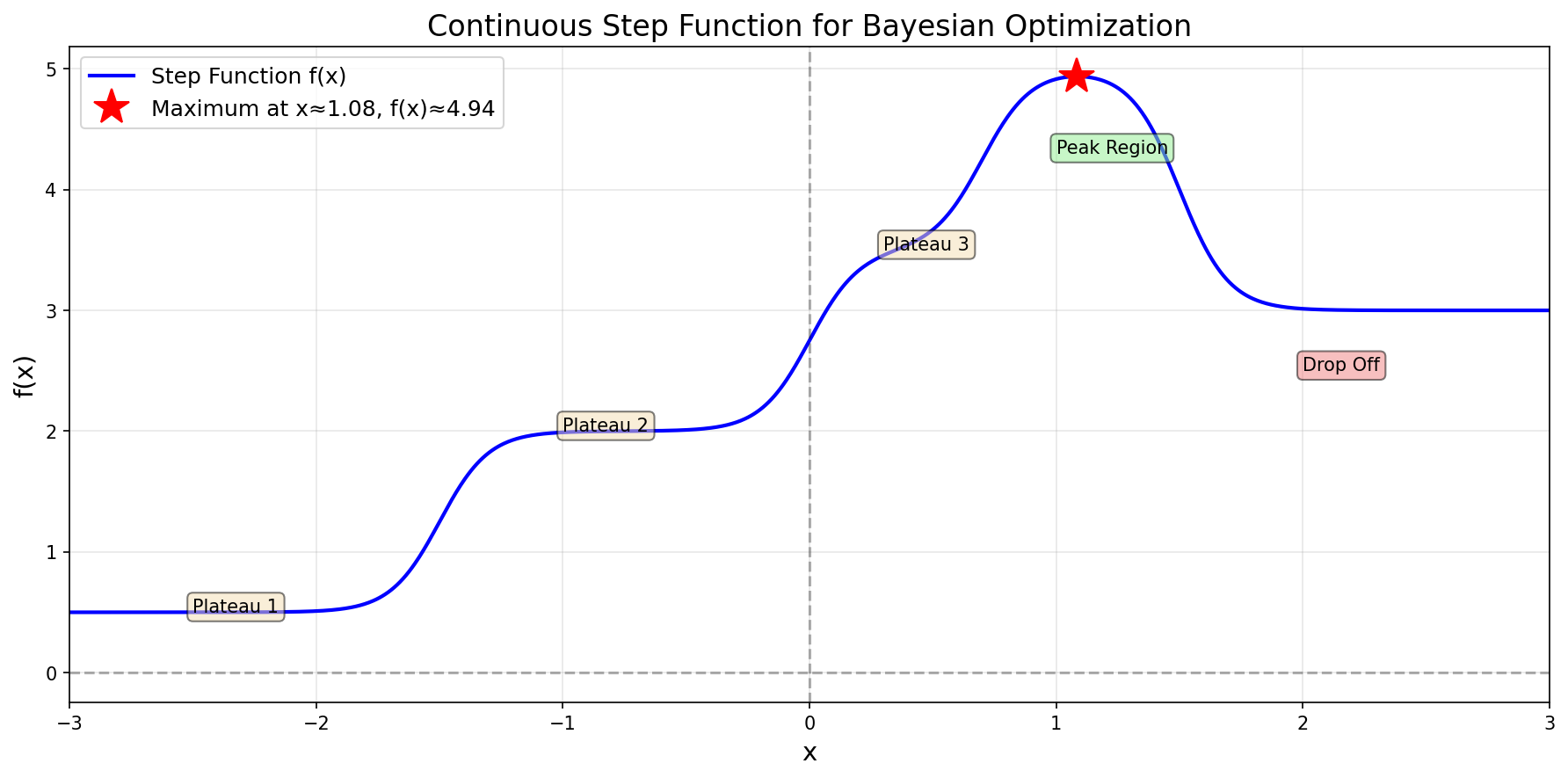
For learning, we use the following made-up “step function”:
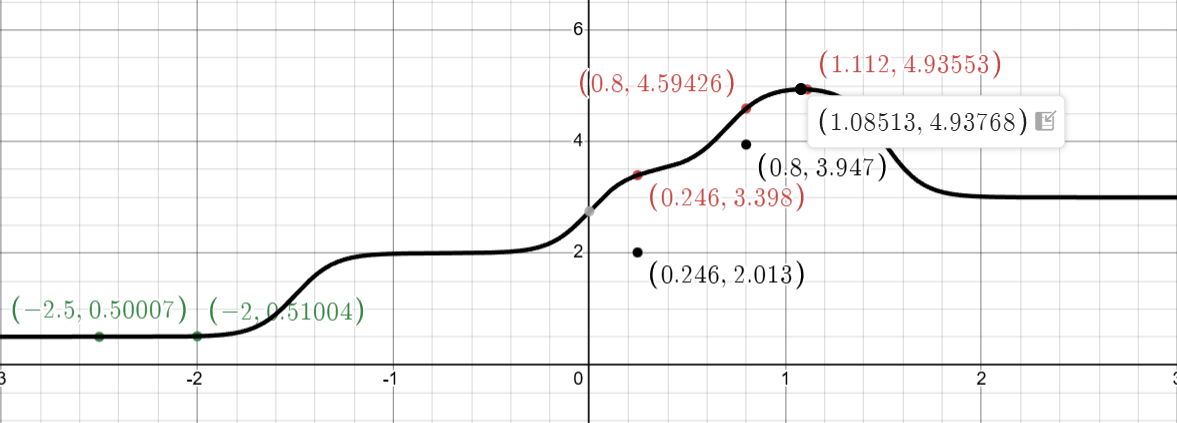
The step function \(f(x)\) we aim to optimize
Reading the graph: the horizontal axis is the input \(x\) (think “the threshold we are trying”), and the vertical axis is the score \(f(x)\) (think “the Dice score we get”). The function climbs in a few steps, from a low plateau on the left to a peak at \(x^* \approx 1.08\), where \(f(x^*) \approx 4.94\), and then drops again.
Why a made-up function? Because we can see the whole curve, we can check whether the method finds the peak. The algorithm cannot see it. It only learns the value of \(f\) at the points it chooses to try, one at a time.
10.3 The Bayesian Optimization Algorithm
The idea in one sentence: keep a best guess of the whole curve, together with a measure of how unsure we are about it, and then try the point that is either promising or unexplored.
Each round has two steps:
Build a surrogate model using all the observations so far. A surrogate is a cheap stand-in for the expensive function. Evaluating it costs a fraction of a second, so we can ask it about thousands of points. We build our surrogate with a Gaussian Process (GP). Despite the name, a GP is not a procedure that runs step by step. In probability, a “process” is a random function: instead of one curve, it describes a whole family of possible curves, each with a probability attached. From the curves that fit our observations, the GP gives us two cheap formulas, a best-guess curve and an error band around it. Those two formulas are the surrogate.
Use an acquisition function to choose the next point to evaluate. An acquisition function gives every possible \(x\) a score for “how worth trying is this spot?” Ours is called the Upper Confidence Bound (UCB).
Then we evaluate the real (expensive) function at the chosen point, add the result to our observations, and repeat.
Because the GP keeps many possible curves rather than one, at any \(x\) those curves give many different values for \(f(x)\). We summarise them with two numbers:
the mean\(\mu(x)\) (“mu of x”): the average of those values, with the more plausible curves counting more. When we have to name one number for \(f(x)\), this average is our best guess;
the variance\(\sigma^2(x)\) (“sigma squared”): how spread out those values are, that is, how unsure we are about the guess. Its square root \(\sigma(x)\), the standard deviation, is in the same units as \(f\), so it is the one we draw as the width of the error band.
Where does the name “Bayesian” come from? It honours Thomas Bayes, who worked out how to update a belief when new evidence arrives. Here, the belief is the family of plausible curves. Each new observation rules out the curves that disagree with it, which narrows the error band near that point. Step 2 shows this with our two observations.
10.4 Initial Observations
We begin with two observations, both on the low plateau on the left:
This is a deliberately unlucky start: both points are far from the peak, and they look almost the same. They tell us very little about the rest of the function. In the plots below you will see this as an error band that is pinched to nearly zero width at these two points and wide everywhere else.
10.5 Iteration 1: First Exploration
We now go through one full round, step by step, with actual numbers. Later rounds repeat the same steps; only the data grows.
10.5.1 Step 1: Fit Gaussian Process
The idea first. A Gaussian Process rests on one assumption: inputs that are close together should have similar outputs. If \(f(-2.0) = 0.51\), then \(f(-1.9)\) is probably close to 0.51 as well, while \(f(2.0)\) could be almost anything. To use this assumption we need a way to measure how “close”, in the sense of how strongly linked, two inputs are. That measure is called a kernel.
We use the RBF kernel (RBF stands for Radial Basis Function; it is also called the squared-exponential or Gaussian kernel). It gives a similarity score between 0 and 1 for any two inputs \(x\) and \(x'\):
\(\|x - x'\|\) is the distance between the two inputs (for single numbers, just \(|x - x'|\));
squaring it and dividing by \(2\ell^2\) turns that distance into a positive number that grows quickly with distance;
\(\exp(-\text{that})\) turns it back into a score: \(\exp(0) = 1\) for zero distance, and it shrinks toward 0 as the distance grows;
\(\ell\) (“ell”), the length scale, sets how far “nearby” reaches. We use \(\ell = 1.0\).
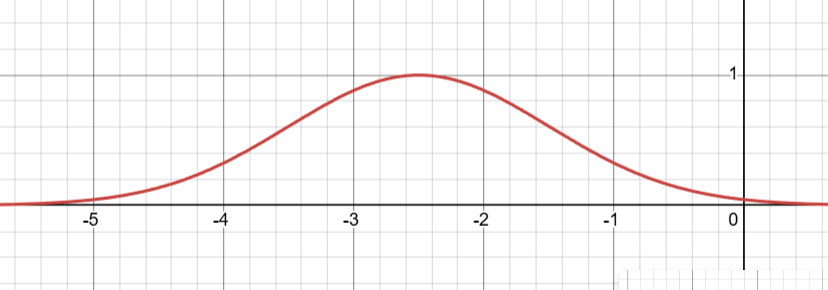
The RBF function \(k(x,x')\) centered at \(x'=-2.5\) with \(\ell = 1\)
The figure shows the kernel’s bell shape. When the two points are identical (\(x = x'\)), the score is \(k(x,x) = \exp(0) = 1.0\), perfect similarity. As the points move apart, the score falls smoothly. With \(\ell = 1.0\), points 0.5 apart score 0.882, points 1.0 apart score 0.607, and points 3.0 apart score only 0.011, which is essentially “unrelated”.
The length scale \(\ell\) is the most important setting in the kernel, because it says how smooth we expect \(f\) to be. A small length scale such as \(\ell = 0.1\) makes similarity drop off very quickly, so each observation only affects its immediate neighbourhood and the guessed curve is allowed to wiggle. A large length scale such as \(\ell = 10.0\) links points far apart, so each observation affects the whole range and the curve must be very smooth. Our \(\ell = 1.0\) is a middle choice.
Try it yourself. The graph below draws \(k(x, x')\) for every \(x\) from \(-3\) to \(3\). Slide \(x'\) to move the centre of the bell: the kernel only cares about the distance between the two points, so the shape travels without changing. Slide \(\ell\) to see how far “similar” reaches. The faint dashed curve is \(\ell = 1\), the value used in this appendix, kept on screen for comparison. Things to try:
Set \(\ell = 0.2\): the bell becomes a narrow spike, and a point only 0.5 away is already almost unrelated.
Set \(\ell = 3\): the bell is so wide that even points 3 apart still score about 0.6.
Set \(x' = -2.5\) and \(\ell = 1\) to get the figure above, then read the similarity of \(x = -2.0\) off the curve (0.882, the number we use for \(\mathbf{K}\) below).
Building the covariance matrix. Next we write the similarity of every observed point to every other observed point in a table. That table is the covariance matrix\(\mathbf{K}\). With two observations it is \(2 \times 2\):
Computing the kernel values (with \(\ell = 1\), the denominator \(2\ell^2\) is just 2): \[
\begin{align}
k(-2.5, -2.5) &= \exp(0) = 1.000\\
k(-2.0, -2.0) &= \exp(0) = 1.000\\
k(-2.5, -2.0) &= \exp\left(-\frac{\|{-2.5}-({-2.0})\|^2}{2}\right) = \exp\left(-\frac{0.25}{2}\right) = \exp(-0.125) \approx 0.882
\end{align}
\]
The diagonal is always 1 (every point is perfectly similar to itself), and the table is symmetric (the similarity of A to B equals that of B to A): \[
\mathbf{K} = \begin{bmatrix}
1.000 & 0.882\\
0.882 & 1.000
\end{bmatrix}
\]
The GP formulas in Step 2 use the inverse\(\mathbf{K}^{-1}\): the matrix that “undoes” \(\mathbf{K}\), the way dividing by 4 undoes multiplying by 4. In practice the computer calculates it for us (in Python, np.linalg.inv(K)): \[
\mathbf{K}^{-1} \approx \begin{bmatrix}
4.521 & -3.990\\
-3.990 & 4.521
\end{bmatrix}
\]
Why do we need an inverse at all? Our two observations are only 0.5 apart, so they are strongly linked (0.882) and largely repeat the same information. \(\mathbf{K}^{-1}\) corrects for that overlap, so that two nearly identical observations are not counted as two fully independent pieces of evidence.
10.5.2 Step 2: Compute GP Predictions
The idea first. Picture every smooth curve you could possibly draw across the graph. The kernel from Step 1 says how plausible each one is: smooth curves are plausible, and curves that zigzag wildly are not. Before we have any data, these curves are spread evenly around 0, so the average curve is flat at 0 and we are equally unsure everywhere. This starting family of curves is called the prior: what we believe before seeing data.
Then we learn that \(f(-2.5) = 0.5\) and \(f(-2.0) = 0.51\). We keep only the curves that pass through (or very near) these two points and drop the rest. A wildly zigzagging curve that happens to pass through both points still counts for very little, because the kernel already rated it unlikely. The family of curves that remains is called the posterior: what we believe after seeing the data. Near the two observations the remaining curves all agree closely; far from them, they still go in every direction.
At any point \(x_*\) (read “x star”, the point we are asking about), the GP summarises all those remaining curves with two numbers: their weighted average, which is the mean \(\mu(x_*)\), and how much they disagree, which is the variance \(\sigma^2(x_*)\). Both come from short formulas:
Here is what each symbol stands for, with our two observations at \(x_1 = -2.5\) and \(x_2 = -2.0\):
\(\mathbf{y}\) (a \(2 \times 1\) column) is the column of results we have actually measured: the outputs of the expensive function at the points we tried. It grows by one entry each time we evaluate \(f\). \[
\mathbf{y} = \begin{bmatrix} f(-2.5) \\ f(-2.0) \end{bmatrix} = \begin{bmatrix} 0.500 \\ 0.510 \end{bmatrix}
\]
\(\mathbf{K}\) (a \(2 \times 2\) matrix) holds the similarity of every observed point to every other, and \(\mathbf{K}^{-1}\) is its inverse. Both were computed in Step 1: \[
\mathbf{K} = \begin{bmatrix} k(-2.5, -2.5) & k(-2.5, -2.0) \\ k(-2.0, -2.5) & k(-2.0, -2.0) \end{bmatrix} = \begin{bmatrix} 1.000 & 0.882 \\ 0.882 & 1.000 \end{bmatrix}
\]\[
\mathbf{K}^{-1} \approx \begin{bmatrix} 4.521 & -3.990 \\ -3.990 & 4.521 \end{bmatrix}
\]
\(\mathbf{k}_*\) (a \(2 \times 1\) column) holds the similarity of the new point \(x_*\) to each observed point. It is the only piece that changes when we ask about a different \(x_*\): \[
\mathbf{k}_* = \begin{bmatrix} k(x_*, -2.5) \\ k(x_*, -2.0) \end{bmatrix} = \begin{bmatrix} \exp\left(-\tfrac{(x_* + 2.5)^2}{2}\right) \\ \exp\left(-\tfrac{(x_* + 2.0)^2}{2}\right) \end{bmatrix}
\]
\(k(x_*, x_*)\) (a single number) is the similarity of \(x_*\) to itself. The distance is 0, so it is always \(\exp(0) = 1\). It is the variance before any data: how unsure we are when we know nothing.
The superscript \(\top\) (“transpose”) turns a column into a row, so that \(\mathbf{k}_*^\top\) is \(1 \times 2\) and the multiplication works.
In both, a \((1 \times 2)\) row times a \((2 \times 2)\) matrix times a \((2 \times 1)\) column gives a \(1 \times 1\) result: a single number. \(\mathbf{K}^{-1}\) and \(\mathbf{y}\) stay fixed until we make a new observation; only \(\mathbf{k}_*\) changes from one \(x_*\) to the next. Step 3 plugs in \(x_* = 0\).
How to read the two formulas:
The mean is a weighted sum of the measured values. Group the formula differently (because \(\mathbf{K}\) is symmetric, this gives the same number): \[
\mu(x_*) = \left(\mathbf{K}^{-1}\mathbf{k}_*\right)^\top \mathbf{y} = w_1 y_1 + w_2 y_2, \qquad \text{where } \mathbf{w} = \mathbf{K}^{-1}\mathbf{k}_*
\] So \(\mathbf{w}\) holds one weight per observation, and these are the weights you can actually see in the formula. Earlier we described \(\mu\) as an average over all the plausible curves. The math that connects the two is beyond this book, but the result is that averaging over the curves works out to exactly this weighted sum of the measured values. The curves’ plausibility enters through the kernel inside \(\mathbf{w}\).
At an observed point the weights are 1 on that observation and 0 on the other, so \(\mu\) equals the measured value. As we move away from the data, both weights shrink toward 0, so \(\mu\) falls back to the prior value 0. These are not ordinary averaging weights: they need not add up to 1, and one can be negative. The negative weight is \(\mathbf{K}^{-1}\) correcting for the two observations repeating each other (see Step 1):
\(x_*\)
\(\mathbf{w} = \mathbf{K}^{-1}\mathbf{k}_*\)
\(w_1 + w_2\)
\(\mu(x_*)\)
\(-2.0\) (observed)
\((0,\ 1)\)
\(1.00\)
\(0.510\)
\(-1.0\)
\((-0.952,\ 1.447)\)
\(0.50\)
\(0.262\)
\(0.0\)
\((-0.341,\ 0.437)\)
\(0.10\)
\(0.052\)
\(1.0\)
\((-0.034,\ 0.041)\)
\(0.01\)
\(0.004\)
The variance starts fully unsure and subtracts what the data tells us.\(k(x_*, x_*) = 1\) is the uncertainty with no data at all. The second term is how much the observations near \(x_*\) reduce that uncertainty. At an observed point it removes almost everything (variance close to 0). Far away it removes almost nothing (variance close to 1).
NoteWhat these formulas are called in other courses
The mean, \(\mu(x_*) = \mathbf{k}_*^\top \mathbf{K}^{-1} \mathbf{y}\)
Linear algebra: the weights \(\mathbf{w} = \mathbf{K}^{-1}\mathbf{k}_*\) are the solution of the linear system\(\mathbf{K}\mathbf{w} = \mathbf{k}_*\). (Software solves the system rather than forming the inverse; our Python code below uses cho_solve.) The mean is then the dot product (inner product) \(\mathbf{w} \cdot \mathbf{y}\), a linear combination of the measured values.
Statistics:\(\mu\) is the conditional mean (conditional expectation) \(E[f(x_*) \mid \text{data}]\) of a multivariate normal distribution; the formula is the standard rule for conditioning one. In geostatistics the same predictor is called simple kriging, and \(\mathbf{w}\) are the kriging weights. It is the best linear predictor: of all weighted sums of the measured values, it has the smallest mean squared error.
The variance, \(\sigma^2(x_*) = k(x_*, x_*) - \mathbf{k}_*^\top \mathbf{K}^{-1} \mathbf{k}_*\)
Linear algebra:\(\mathbf{k}_*^\top \mathbf{K}^{-1} \mathbf{k}_*\) is a quadratic form. The whole expression is the Schur complement of \(\mathbf{K}\) in the joint covariance matrix \(\begin{bmatrix} \mathbf{K} & \mathbf{k}_* \\ \mathbf{k}_*^\top & k(x_*, x_*) \end{bmatrix}\).
Statistics:\(\sigma^2\) is the conditional variance\(\operatorname{Var}[f(x_*) \mid \text{data}]\), also called the kriging variance. It reads as “prior variance minus the part explained by the data”, the same idea as explained variance (\(R^2\)) in regression.
The pieces
\(\mathbf{K}\) is a covariance matrix; in linear-algebra terms, a Gram matrix. It is symmetric and positive definite, which is why \(\mathbf{K}^{-1}\) exists.
\(\sigma\) is the standard deviation, and the \(\pm 2\sigma\) band is an approximately 95% credible interval (the Bayesian counterpart of a confidence interval).
This is what creates the characteristic “sausage” shape in the GP plots below. The width of the sausage (the uncertainty) is smallest at the observed points, grows as we move away from them, and reaches its maximum where no observation is nearby. How quickly it widens is set by the length scale \(\ell\).
The formulas work for any\(x_*\), not just the observed points. That is what makes the GP useful: it is cheap to ask about thousands of points we have never tried.
10.5.3 Step 3: Example Calculations at Key Points
To see the formulas in action, we evaluate them by hand at a few points: \(x = 0\), \(x = 0.5\) and \(x = 1.0\). These points are chosen only for illustration. We have not yet decided where to sample next; that comes in Steps 4 and 5. Here we are simply asking the GP what it “thinks” about a few places.
At \(x_* = 0.0\), in full.
First, the similarity of \(x_* = 0\) to each observation: \[
\mathbf{k}_* = \begin{bmatrix} k(0, -2.5) \\ k(0, -2.0) \end{bmatrix} = \begin{bmatrix} \exp(-6.25/2) \\ \exp(-4.0/2) \end{bmatrix} = \begin{bmatrix} 0.044 \\ 0.135 \end{bmatrix}
\]
Both are small: 0 is 2.5 and 2.0 units away from the data, so it is only weakly linked to it.
Next, the weights \(\mathbf{w} = \mathbf{K}^{-1}\mathbf{k}_*\), one per observation. We use them for both the mean and the variance: \[
\mathbf{w} = \mathbf{K}^{-1}\mathbf{k}_* = \begin{bmatrix} 4.521(0.044) - 3.990(0.135) \\ -3.990(0.044) + 4.521(0.135) \end{bmatrix} \approx \begin{bmatrix} -0.341 \\ 0.437 \end{bmatrix}
\]
The mean is the weighted sum of the measured values: \[
\mu(0) = \mathbf{w}^\top \mathbf{y} = (-0.341)(0.500) + (0.437)(0.510) \approx 0.052
\]
The weights add up to only about \(0.10\). That is why \(\mu(0)\) is close to 0 even though both measured values are about 0.5: the point \(x = 0\) is too far from the data for the data to count for much.
For the variance, the same weights give \[
\mathbf{k}_*^\top \mathbf{K}^{-1} \mathbf{k}_* = \mathbf{k}_*^\top \mathbf{w} \approx 0.044(-0.341) + 0.135(0.437) \approx 0.044
\]
In words: at \(x = 0\) the GP’s best guess is about 0.05, barely above the prior value 0, and it is still almost completely unsure. The data removed only about 4% of the uncertainty.
(If you redo these steps with a calculator, expect small differences in the last digit from rounding. The values here come from the unrounded numbers.)
At \(x_* = 0.5\) and \(x_* = 1.0\). The same steps give: \[
\begin{align}
\mu(0.5) &\approx 0.016, & \sigma(0.5) &\approx 0.997\\
\mu(1.0) &\approx 0.004, & \sigma(1.0) &\approx 1.000
\end{align}
\]
What does \(\mu(0.5) \approx 0.016\) mean? It is the weighted average of \(f(0.5)\) over all the smooth curves that pass near our two observations. Some of those curves say \(f(0.5) = 0.5\), others \(-0.2\), others \(1.0\). Weighting each by how plausible it is gives about 0.016. The variance \(\sigma^2(0.5) \approx 0.995\) says how much those curves disagree. A large variance means they are all over the place (little agreement); a small variance means most of them agree on a value close to the mean. At \(x = 0.5\) there is almost no agreement: our two observations are too far away to say much.
Notice the pattern as we move right, away from the data: the mean slides toward 0 and the uncertainty climbs toward 1.
10.5.4 Step 4: Compute UCB Acquisition Function
The idea first. We now need to turn “best guess plus uncertainty” into a single score for each point. UCB is an optimist’s score: for each \(x\), imagine the function is about as good as it could plausibly be there.
\(\mu(x)\) rewards points whose predicted value is high (exploit);
\(\kappa\,\sigma(x)\) is a bonus for points we know little about (explore);
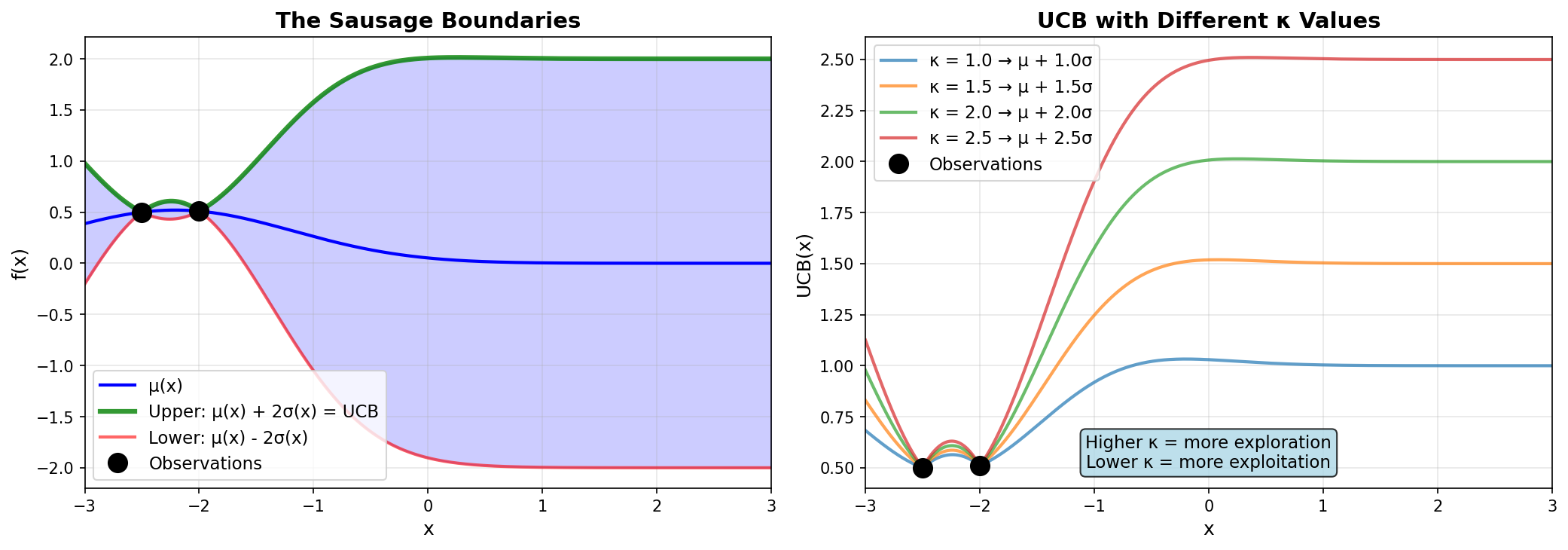
\(\kappa\) (“kappa”) is an adventurousness dial. A small \(\kappa\) plays it safe near the best result so far; a large \(\kappa\) goes looking in the unknown. We use \(\kappa = 2.0\).
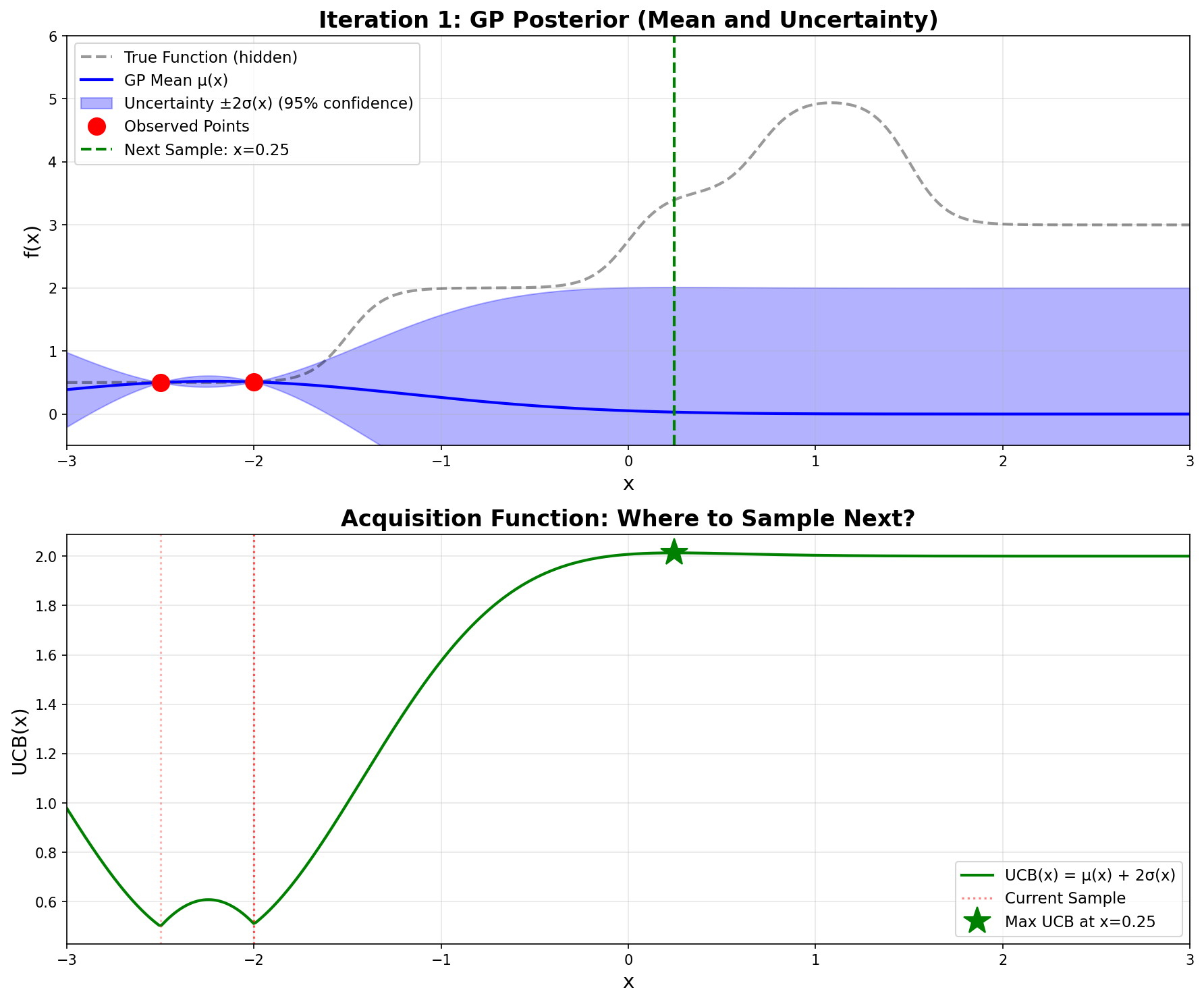
The procedure. Spread 500 evenly spaced test points from \(x = -3\) to \(x = 3\). At each one, compute \(\mu(x)\) and \(\sigma(x)\) with the GP formulas, and then UCB. Pick the test point with the largest UCB; that is where we evaluate the real function next. Computing UCB at 500 points is cheap because it only uses the GP formulas. The expensive true function \(f(x)\) is evaluated once per round, at the single winning point.
None of these is the winner. Over all 500 test points, the largest UCB is at \(x = 0.246\), with \(\text{UCB}(0.246) = 2.013\).
Key Insight: The “sweet spot” balances mean and variance
Here is UCB at a wider range of points:
\(x\)
\(\mu(x)\)
\(\sigma(x)\)
\(\text{UCB}(x)\)
\(-2.5\)
\(0.500\)
\(0.000\)
\(0.500\)
\(-2.0\)
\(0.510\)
\(0.000\)
\(0.510\)
\(-1.0\)
\(0.262\)
\(0.657\)
\(1.576\)
\(0.0\)
\(0.052\)
\(0.978\)
\(2.007\)
\(\mathbf{0.246}\)
\(\mathbf{0.030}\)
\(\mathbf{0.992}\)
\(\mathbf{2.013}\) ★
\(0.5\)
\(0.016\)
\(0.997\)
\(2.011\)
\(1.0\)
\(0.004\)
\(1.000\)
\(2.004\)
\(2.0\)
\(0.000\)
\(1.000\)
\(2.000\)
Reading the table from top to bottom:
At the observations (\(x = -2.5, -2.0\)), the mean is known exactly and the uncertainty is zero, so UCB is just the observed value. There is nothing new to learn there.
Near the observations (\(x = -1.0\)), the mean is still somewhat above 0, but the uncertainty is only partly restored, so UCB is moderate.
Far from the observations (\(x \geq 1\)), the uncertainty is at its maximum of 1, but the mean has fallen all the way to 0, so UCB is about \(0 + 2(1) = 2\).
In between (\(x \approx 0.25\)), the uncertainty is already almost at its maximum while a little of the mean is left over. That small leftover tips the balance, and UCB peaks there.
All the UCB values from \(x = 0\) to \(x = 2\) are within about 0.01 of each other. In this first round the choice is driven mostly by uncertainty: the algorithm is exploring, and it picks the unexplored spot that is still slightly connected to what it has seen.
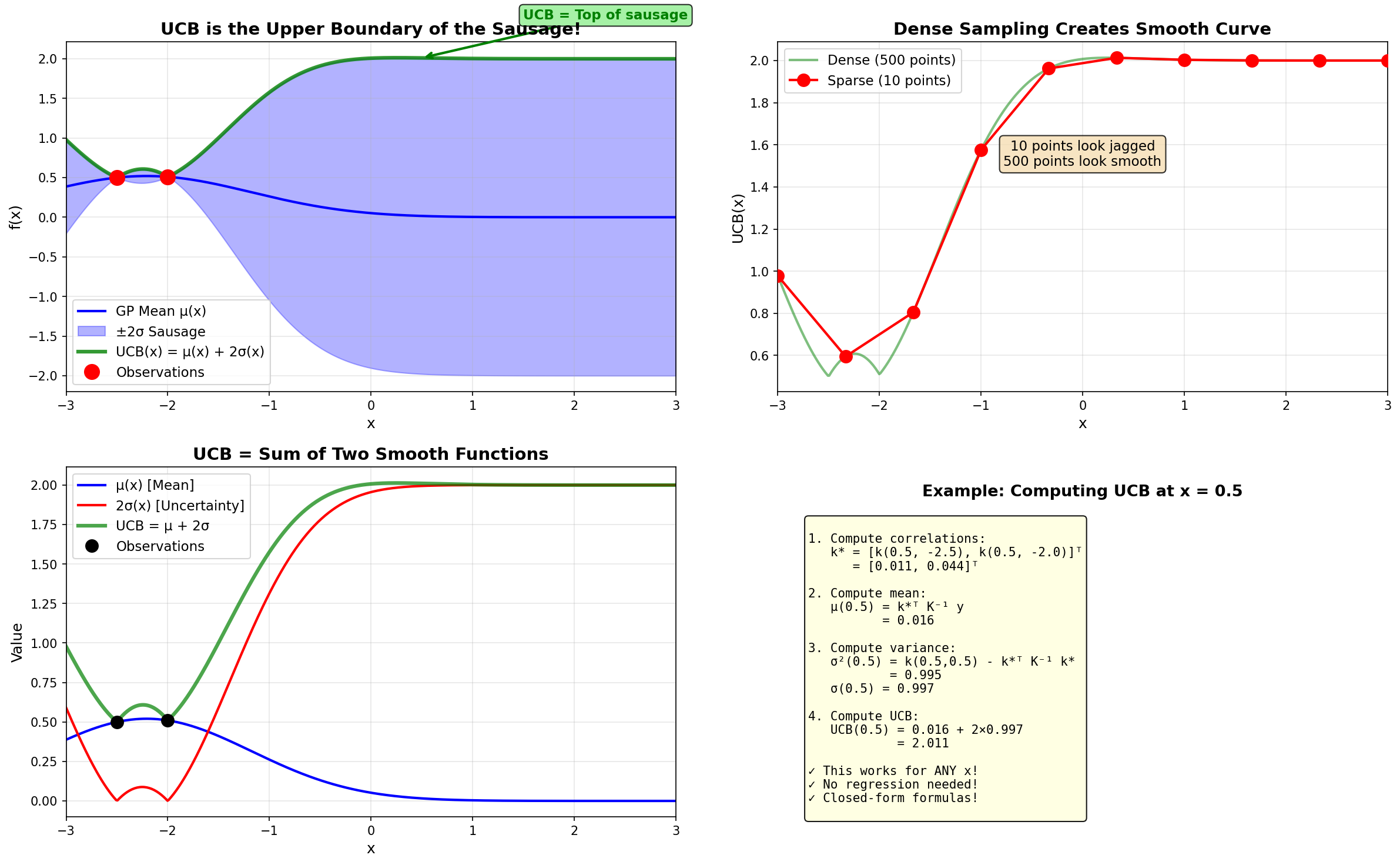
The green UCB curve literally traces the top edge of the blue uncertainty sausage!
How the UCB curve is generated: computed analytically at 500 points, not fitted
The smoothness of the sausage comes from the Gaussian Process itself: the RBF kernel changes smoothly with distance, so both \(\mu(x)\) and \(\sigma(x)\) are smooth curves, and therefore so is \(\text{UCB}(x) = \mu(x) + 2\sigma(x)\). The 500 points are simply joined up; no curve is fitted to them.
The relationship between UCB and the sausage boundaries. Left: UCB is the upper boundary. Right: Different \(\kappa\) values control exploration vs exploitation.
Iteration 1 – GP posterior and UCB acquisition function
Top plot: The blue line is the GP mean \(\mu(x)\), and the shaded blue region is the \(\pm 2\sigma\) uncertainty “sausage”. Notice how wide the sausage is everywhere except at our two red observation points.
Bottom plot: The green curve shows \(\text{UCB}(x)\). The maximum occurs at \(x = 0.246\) (green star), which becomes our next sampling point.
The dashed black line (true function) is hidden from the algorithm—it can only see the red dots!
10.5.5 Step 5: Sample at \(x = 0.246\)
Now, and only now, we pay for one expensive evaluation of the real function: \(\boxed{f(0.246) = 3.398}\)
This is a huge discovery! The function value jumped from \(\approx 0.5\) to \(\approx 3.4\). This tells the GP that the function has structure beyond the low plateau we started on. One carefully chosen try, aimed where we knew the least, paid off. This is the “explore” half of the oven reasoning at work. In the next round, the high value at \(x = 0.246\) will pull the best guess upward, and the algorithm will start to “exploit” it.
10.6 Iteration 2: Exploiting the Discovery
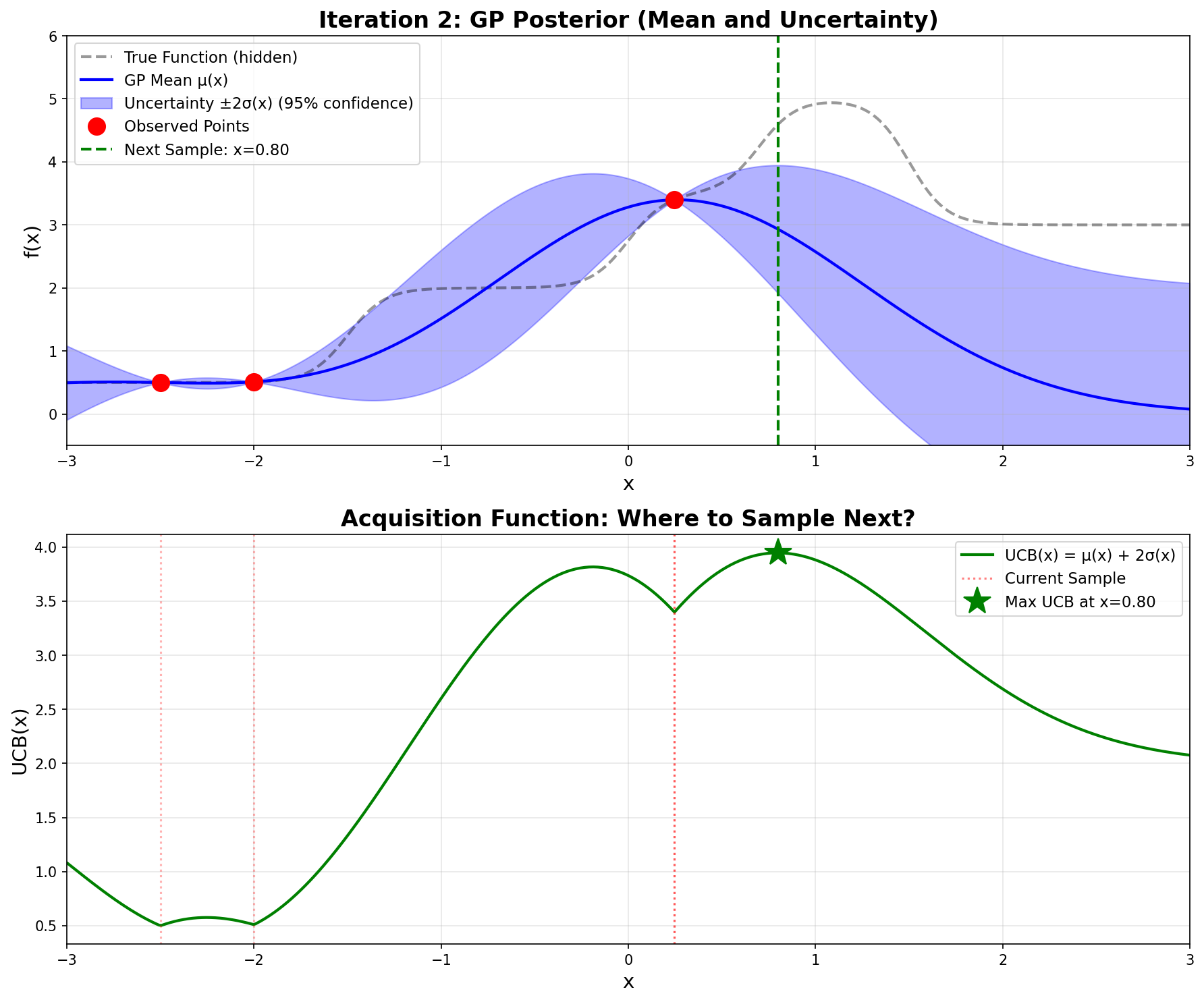
Now we have three observations: \((-2.5, 0.500)\), \((-2.0, 0.510)\), and \((0.246, 3.398)\).
The GP recomputes its posterior. The high value at \(x = 0.246\) pulls the mean upward in that region, and the uncertainty shrinks around our three observed points.
Computing UCB across the domain, the maximum now occurs at \(\mathbf{x = 0.800}\):
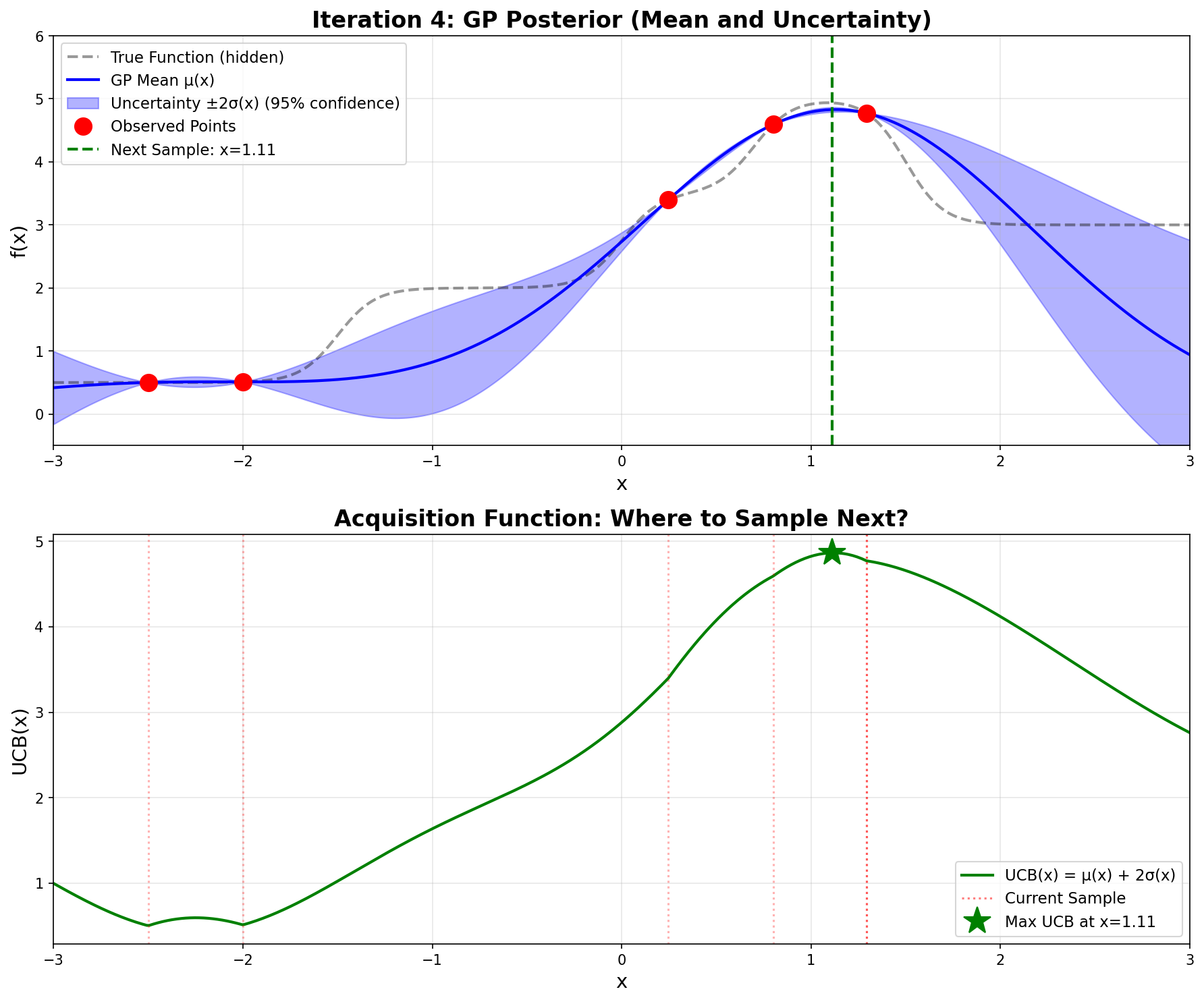
Notice how \(\mathbf{\sigma}\)is very small now—the GP is confident because we have observations nearby.
Iteration 4 – Very tight uncertainty, confident prediction
Sampling gives \(\boxed{f(1.112) = 4.935}\). We’ve found the optimum!
10.9 Interactive: Bayesian Optimization Explorer
The two widgets below let you build intuition for Bayesian Optimization by interacting with it directly.
10.9.1 1D: Exploring the Step Function
The GP posterior — the “sausage” — deflates wherever you add an observation and expands in unexplored regions. The UCB acquisition function (bottom panel) peaks where high predicted mean meets high uncertainty.
How to use: Click anywhere on the GP panel to place a custom observation, or press Add Next Sample to let UCB choose. Drag the κ slider to tune exploration (high κ) vs. exploitation (low κ).
10.9.2 2D: Optimizing Urothelial Cell Thresholds
In the urothelial cell project, two threshold parameters jointly determine segmentation quality:
cytoplasm_min (z axis): lower intensity cutoff for cytoplasm detection (range 0.05–0.55)
Dice score (y axis): segmentation accuracy — what we want to maximize (Section 11.8.3)
The surface shows the GP posterior mean. Colors indicate uncertainty: blue = confident, orange/red = uncertain. The floor heatmap shows the UCB acquisition function. Drag to rotate.
10.10 Python Implementation
Now let’s implement the complete Bayesian Optimization algorithm in Python. The code below reproduces the optimization we just performed by hand.
import numpy as npimport matplotlib.pyplot as pltfrom scipy.linalg import cho_factor, cho_solve# ============================================================================# STEP 1: Define the black-box function (what we're optimizing)# ============================================================================def step_function(x):""" The 'black box' function we're trying to optimize. In real applications, this could be: - Training a neural network and returning validation accuracy - Running an expensive simulation - A physical experiment For demonstration, we use a continuous step function made from sigmoids. """ step1 =1.5/ (1+ np.exp(-10* (x +1.5))) step2 =1.5/ (1+ np.exp(-10* (x -0.0))) step3 =1.5/ (1+ np.exp(-10* (x -0.7))) step4 =-2.0/ (1+ np.exp(-10* (x -1.5)))return step1 + step2 + step3 + step4 +0.5# ============================================================================# STEP 2: Implement Gaussian Process# ============================================================================def rbf_kernel(x1, x2, length_scale=1.0):"""RBF (Radial Basis Function) kernel: k(x,x') = exp(-||x-x'||²/2ℓ²)""" sqdist = np.sum((x1[:, None] - x2[None, :]) **2, axis=2)return np.exp(-0.5* sqdist / length_scale**2)def gp_predict(X_train, y_train, X_test, length_scale=1.0, noise=1e-8):""" Compute GP posterior: μ(x) and σ(x) Returns: mu: posterior mean at X_test points sigma: posterior standard deviation at X_test points """# Compute covariance matrices K = rbf_kernel(X_train, X_train, length_scale) + noise * np.eye(len(X_train)) K_s = rbf_kernel(X_train, X_test, length_scale) K_ss = rbf_kernel(X_test, X_test, length_scale)# Solve using Cholesky decomposition (numerically stable) L = cho_factor(K, lower=True) alpha = cho_solve(L, y_train)# Posterior mean: μ(x) = k*ᵀ K⁻¹ y mu = K_s.T @ alpha# Posterior variance: σ²(x) = k(x,x) - k*ᵀ K⁻¹ k* v = cho_solve(L, K_s) var = np.diag(K_ss) - np.sum(K_s * v, axis=0)return mu, np.sqrt(np.maximum(var, 0))# ============================================================================# STEP 3: Implement UCB acquisition function# ============================================================================def ucb(mu, sigma, kappa=2.0):"""Upper Confidence Bound: UCB(x) = μ(x) + κ·σ(x)"""return mu + kappa * sigma# ============================================================================# STEP 4: Run Bayesian Optimization# ============================================================================# Initial observations (starting point)X_observed = np.array([[-2.5], [-2.0]])y_observed = np.array([step_function(x[0]) for x in X_observed])print("Bayesian Optimization Results")print("="*60)print(f"Initial observations:")print(f" x = {X_observed[0,0]:.1f}, f(x) = {y_observed[0]:.3f}")print(f" x = {X_observed[1,0]:.1f}, f(x) = {y_observed[1]:.3f}")print()# Dense test points for computing acquisition functionX_test = np.linspace(-3, 3, 500).reshape(-1, 1)# Run 4 iterationsfor iteration inrange(1, 5):print(f"Iteration {iteration}:")# Fit GP and compute UCB mu, sigma = gp_predict(X_observed, y_observed, X_test, length_scale=1.0) ucb_values = ucb(mu, sigma, kappa=2.0)# Find next point to sample (maximize UCB) next_idx = np.argmax(ucb_values) next_x = X_test[next_idx, 0]print(f" Next point: x = {next_x:.3f}")print(f" UCB({next_x:.3f}) = {ucb_values[next_idx]:.3f}")# Evaluate the black-box function next_y = step_function(next_x)print(f" f({next_x:.3f}) = {next_y:.3f}")# Update observations X_observed = np.vstack([X_observed, [[next_x]]]) y_observed = np.append(y_observed, next_y)# Show current best best_idx = np.argmax(y_observed)print(f" Current best: x = {X_observed[best_idx,0]:.3f}, "f"f(x) = {y_observed[best_idx]:.3f}")print()print("="*60)print("Optimization complete!")print(f"Found optimum: x* = {X_observed[best_idx,0]:.3f}, "f"f(x*) = {y_observed[best_idx]:.3f}")print(f"Total function evaluations: {len(X_observed)}")
10.10.1 Code Output
Running this code produces:
Bayesian Optimization Results
============================================================
Initial observations:
  x = -2.5, f(x) = 0.500
  x = -2.0, f(x) = 0.510

Iteration 1:
  Next point: x = 0.246
  UCB(0.246) = 2.013
  f(0.246) = 3.398
  Current best: x = 0.246, f(x) = 3.398

Iteration 2:
  Next point: x = 0.800
  UCB(0.800) = 3.947
  f(0.800) = 4.593
  Current best: x = 0.800, f(x) = 4.593

Iteration 3:
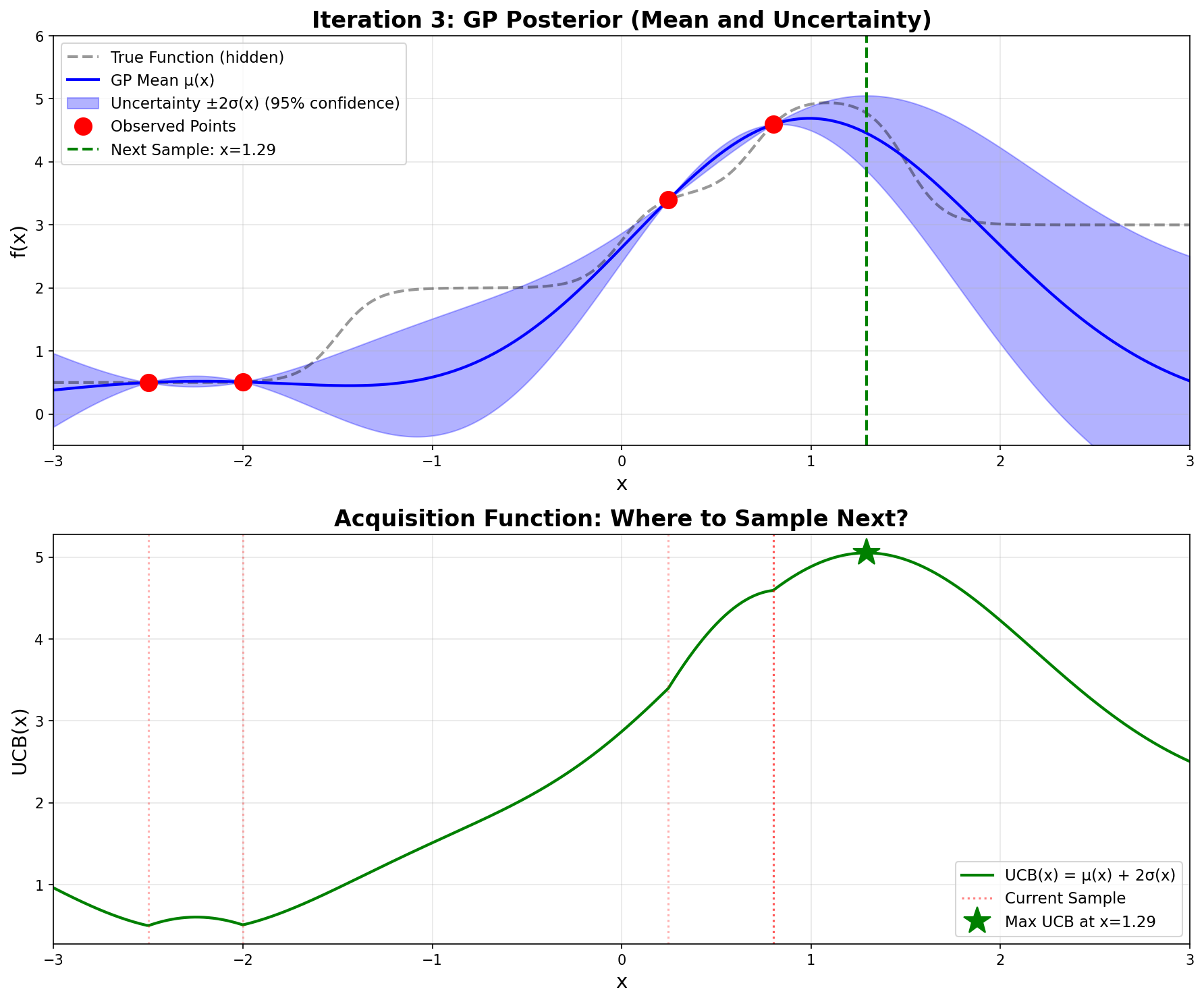
  Next point: x = 1.293
  UCB(1.293) = 5.052
  f(1.293) = 4.773
  Current best: x = 1.293, f(x) = 4.773

Iteration 4:
  Next point: x = 1.112
  UCB(1.112) = 4.866
  f(1.112) = 4.935
  Current best: x = 1.112, f(x) = 4.935

============================================================
Optimization complete!
Found optimum: x* = 1.112, f(x*) = 4.935
Total function evaluations: 6
These results exactly match the hand calculations we performed!
The step function \(f(x)\) graphed in Desmos. The dots in green were the initial values, the black points represent guesses, while the red points are the results of first, second, and last iterations. We can see the actual maximum occurs at 1.08513 while the Bayesian Optimization results in 1.112. Very close!
10.10.2 Key Implementation Notes
The Black-Box Function: step_function(x) represents our expensive-to-evaluate function. It’s built from sigmoid functions to create the step-like behavior, but in practice this could be any expensive computation.
Gaussian Process: The gp_predict() function implements the closed-form GP formulas:
UCB Acquisition: Simple formula \(\text{UCB}(x) = \mu(x) + \kappa \cdot \sigma(x)\) balances exploration (\(\kappa\) = 2.0) and exploitation.
Efficiency: Found the optimum in just 6 function evaluations (including 2 initial points) instead of exhaustively sampling the space.
10.11 Practical Implementation with Scikit-Optimize
While the from-scratch implementation above is invaluable for understanding how Bayesian optimization works under the hood, in practice you’ll want to use established libraries that provide robust, well-tested implementations with many additional features. The scikit-optimize (skopt) library is the standard choice for Bayesian optimization in Python.
10.11.1 Simple Example: Optimizing the Step Function
Let’s solve the same step function problem using gp_minimize from scikit-optimize:
# You may need: !pip install scikit-optimizefrom skopt import gp_minimizefrom skopt.space import Realimport numpy as np# Define the step function (same as before)def step_function(x): step1 =1.5/ (1+ np.exp(-10* (x +1.5))) step2 =1.5/ (1+ np.exp(-10* (x -0.0))) step3 =1.5/ (1+ np.exp(-10* (x -0.7))) step4 =-2.0/ (1+ np.exp(-10* (x -1.5)))return step1 + step2 + step3 + step4 +0.5# Note: gp_minimize MINIMIZES, so we negate for maximizationdef negative_step_function(x):return-step_function(x[0]) # x is a list with one element# Define the search spacespace = [Real(-3.0, 3.0, name='x')]# Run Bayesian optimizationresult = gp_minimize( negative_step_function, space, x0=[[-2.5], [-2.0]], n_calls=4, n_initial_points=0, acq_func='LCB', # ← Lower Confidence Bound (negative UCB) kappa=2.0, # ← κ = 2.0 (same as our UCB implementation) acq_optimizer='sampling', # ← Evaluate at many points (like our 500-point grid) n_points=500, # ← Number of points to sample (matches our approach) random_state=42, verbose=True)print(f"\nOptimal x: {result.x[0]:.3f}")print(f"Optimal f(x): {-result.fun:.3f}") # Negate back for maximumprint(f"Total evaluations: {len(result.func_vals)}")
Iteration No: 1 started. Evaluating function at provided point.
Iteration No: 1 ended. Evaluation done at provided point.
Time taken: 0.0313
Function value obtained: -0.5100
Current minimum: -0.5100
Iteration No: 2 started. Evaluating function at provided point.
Iteration No: 2 ended. Evaluation done at provided point.
Time taken: 0.0452
Function value obtained: -0.5098
Current minimum: -0.5100
Iteration No: 3 started. Searching for the next optimal point.
Iteration No: 3 ended. Search finished for the next optimal point.
Time taken: 0.0474
Function value obtained: -0.5569
Current minimum: -0.5569
Iteration No: 4 started. Searching for the next optimal point.

Optimal x: -1.823
Optimal f(x): 0.557
Total evaluations: 4
10.11.2 Why Scikit-Optimize Requires More Iterations
An important practical observation emerges when comparing our from-scratch implementation with scikit-optimize: while our custom implementation found the optimum at x ≈ 1.085 in just 6 function evaluations, scikit-optimize requires approximately 20 evaluations to reach the same result, even when configured with matching parameters (LCB acquisition with κ = 2.0, sampling-based optimization with 500 points). This difference is not a flaw in either implementation, but rather illustrates fundamental tradeoffs between control and generality in optimization libraries.
The primary reason for this discrepancy lies in how each implementation handles the Gaussian Process kernel hyperparameters. Our from-scratch implementation uses a fixed RBF kernel with length scale ℓ = 1.0 throughout the entire optimization process. This fixed length scale embeds a specific assumption about function smoothness that happens to match our step function well. In contrast, scikit-optimize automatically optimizes the kernel hyperparameters at each iteration by maximizing the marginal likelihood of the observed data. While this adaptive approach makes scikit-optimize more robust across diverse problem types, it means the GP’s notion of “smoothness” changes as new data arrives, potentially requiring more iterations to converge as the algorithm explores different length scales before settling on appropriate values.
A second source of divergence comes from the acquisition function optimization strategy. Although we specified sampling-based optimization with 500 points in both implementations, the nature of this sampling differs crucially. Our from-scratch version evaluates the UCB acquisition function at 500 uniformly-spaced points across the domain [-3, 3], creating a deterministic grid that guarantees we sample the acquisition function at regular intervals. Scikit-optimize’s sampling strategy, however, uses random points drawn from the search space at each iteration. While this randomization prevents systematic bias and works well on average, it introduces variability—the random samples in any particular iteration might miss the region where UCB is maximized, requiring additional iterations to discover high-potential areas that a uniform grid would have captured immediately.
The initial point configuration also plays a subtle but important role. Our two initial observations at x = -2.5 and x = -2.0 are quite close together, separated by only 0.5 units. This proximity means the GP has detailed information about a small region but limited knowledge about the global function behavior. Different implementations handle this uncertainty differently through their choice of numerical stability parameters, jitter terms added to the covariance matrix, and Cholesky decomposition algorithms. These implementation details, while seemingly minor, affect the GP’s predictions and consequently the acquisition function values, leading to different sampling decisions even when the high-level algorithm appears identical.
This comparison reveals a crucial lesson about the value of understanding algorithmic details. Our from-scratch implementation is not inherently “better”—it’s simply more specialized. We tuned every parameter specifically for this particular step function, achieving maximum efficiency for this exact problem. Scikit-optimize, by contrast, is designed to work robustly across an enormous variety of optimization problems without manual tuning. It sacrifices some efficiency on any particular problem to gain reliability across all problems. When you know your problem well and can carefully tune parameters, a custom implementation can be remarkably efficient. When you’re optimizing diverse problems or want a “works out of the box” solution, the extra iterations required by scikit-optimize are a worthwhile price for its generality and robustness.
For practical applications, this suggests a rule of thumb: when using scikit-optimize or similar libraries, budget for 30-50 function evaluations for 1D problems and scale accordingly with dimension (roughly 10-20 evaluations per dimension is a reasonable starting point). This is still far superior to grid search or random search, but reflects the reality that general-purpose implementations need more samples than highly-tuned custom code. The from-scratch implementation in this tutorial remains valuable not just for education, but as a template for building specialized optimizers when you have specific knowledge about your problem domain and want maximum efficiency.
10.11.3 Key Parameters Explained
result = gp_minimize( negative_step_function, space, x0=[[-2.5], [-2.0]], n_calls=4, n_initial_points=0, acq_func='LCB', # ← Lower Confidence Bound (negative UCB) kappa=2.0, # ← κ = 2.0 (same as our UCB implementation) acq_optimizer='sampling', # ← Evaluate at many points (like our 500-point grid) n_points=500, # ← Number of points to sample (matches our approach) random_state=42, verbose=True)
Important parameters:
n_calls: Total number of function evaluations
Must be ≥ n_initial_points + number of points in x0
Example: n_calls=30, n_initial_points=10, x0 has 2 points → runs 10 random + 2 from x0 + 18 GP-guided evaluations
n_initial_points: Number of random evaluations before starting GP
Default is 10
Set to 0 if you’re providing all initial points via x0
These points help the GP build an initial model
x0: Specific initial points to evaluate
Optional; if None, uses random sampling for initial points
Useful when you have good guesses about where the optimum might be
Use the from-scratch implementation when: - Learning how Bayesian optimization works - Need to modify the GP kernel or acquisition function - Publishing research on optimization algorithms - Teaching or writing educational content
Use scikit-optimize when: - Building production systems - Need reliable, tested implementations - Want advanced features (parallel, checkpointing, visualization) - Optimizing hyperparameters for machine learning - Time to solution matters more than understanding internals
10.11.7 Connection to Deep Learning
The threshold optimization example directly translates to hyperparameter tuning:
# Hyperparameter optimization for neural networkfrom skopt.space import Real, Integer, Categoricaldef train_and_evaluate(params):""" Train model with given hyperparameters and return validation loss. """ learning_rate, batch_size, n_layers, dropout = params# Build and train model model = build_model(n_layers=n_layers, dropout=dropout) history = model.fit( X_train, y_train, batch_size=batch_size, learning_rate=learning_rate, validation_data=(X_val, y_val), epochs=50 )# Return validation loss (to be minimized)return history.history['val_loss'][-1]# Define search spacespace = [ Real(1e-5, 1e-1, prior='log-uniform', name='learning_rate'), Integer(16, 128, name='batch_size'), Integer(2, 10, name='n_layers'), Real(0.0, 0.5, name='dropout')]# Optimize (expensive: each call trains a full neural network!)result = gp_minimize( train_and_evaluate, space, n_calls=50, # Only 50 training runs acq_func='EI', # Expected Improvement (conservative) n_jobs=4, # Train 4 models in parallel random_state=42)print(f"Best hyperparameters: {result.x}")print(f"Best validation loss: {result.fun:.4f}")
This is exactly why Bayesian optimization is the preferred method for hyperparameter tuning—it finds good configurations in far fewer expensive evaluations than grid search or random search.
10.11.8 Common Errors and Solutions
Error: ValueError: Expected n_calls >= X, got Y
This happens when n_calls is too small. The total must be:
n_calls ≥ n_initial_points + len(x0)
Solution:
# Option 1: Increase n_callsresult = gp_minimize(func, space, n_calls=30) # Default n_initial_points=10# Option 2: Reduce n_initial_points if providing x0result = gp_minimize(func, space, x0=[[0.5]], n_calls=6, n_initial_points=0)# Option 3: Let it use defaults (usually best)result = gp_minimize(func, space, n_calls=50) # 10 random + 40 GP-guided
Error: ModuleNotFoundError: No module named 'skopt'
In Google Colab or Jupyter, run:
!pip install scikit-optimize
Then restart the runtime or re-import:
from skopt import gp_minimize
10.12 Technical Considerations & Derivations
10.12.1 Derivation of GP Prediction Formulas
The Gaussian Process prediction formulas we’ve been using have elegant derivations rooted in linear algebra and probability theory. Understanding where these formulas come from provides deeper insight into why Bayesian optimization works.
The Multivariate Gaussian Foundation
A Gaussian Process defines a joint Gaussian distribution over function values at any finite set of points. Suppose we have observed function values \(\mathbf{y} = [f(x_1), f(x_2), \ldots, f(x_n)]^\top\) at points \(X = \{x_1, x_2, \ldots, x_n\}\), and we want to predict the function value \(f_*\) at a new point \(x_*\). The joint distribution of observed and test values is:
where \(\mathbf{K}\) is the \(n \times n\) covariance matrix of observed points, and \(\mathbf{k}_* = [k(x_*, x_1), k(x_*, x_2), \ldots, k(x_*, x_n)]^\top\) is the vector of covariances between \(x_*\) and the observed points.
Conditional Gaussian Distribution
The key mathematical tool is the formula for conditioning in multivariate Gaussians. Given a joint Gaussian distribution:
Geometric Interpretation: Projection in Function Space
The posterior mean formula \(\mu(x_*) = \mathbf{k}_*^\top \mathbf{K}^{-1} \mathbf{y}\) has a beautiful geometric interpretation. We can think of the GP as living in an infinite-dimensional Hilbert space where functions are vectors. The kernel functions \(k(\cdot, x_i)\) centered at each observed point form a basis for a subspace.
The term \(\mathbf{K}^{-1} \mathbf{y}\) computes the coefficients (weights) \(\boldsymbol{\alpha}\) that best represent our observations in this basis. Specifically, we’re solving the linear system \(\mathbf{K} \boldsymbol{\alpha} = \mathbf{y}\) for \(\boldsymbol{\alpha}\). This is analogous to finding coordinates in a new basis using the change of basis formula.
The posterior mean at \(x_*\) is then: \[
\mu(x_*) = \sum_{i=1}^n \alpha_i k(x_*, x_i)
\]
This is a weighted sum of kernel functions, where the weights \(\alpha_i\) are chosen so that \(\mu(x_i) = y_i\) at all observed points (when noise is zero). Geometrically, we’re projecting the unknown true function onto the span of kernel functions centered at our observations.
Understanding the Variance Formula
The variance formula \(\sigma^2(x_*) = k(x_*, x_*) - \mathbf{k}_*^\top \mathbf{K}^{-1} \mathbf{k}_*\) has an equally elegant interpretation:
Prior variance:\(k(x_*, x_*)\) represents our uncertainty before seeing any data. For the RBF kernel, this equals 1.0 everywhere.
Information reduction: The term \(\mathbf{k}_*^\top \mathbf{K}^{-1} \mathbf{k}_*\) measures how much information our observations provide about \(x_*\). This can be understood as the squared length of the projection of \(\mathbf{k}_*\) onto the space spanned by the columns of \(\mathbf{K}\).
Mathematically, we can write: \[
\mathbf{k}_*^\top \mathbf{K}^{-1} \mathbf{k}_* = \|\mathbf{K}^{-1/2} \mathbf{k}_*\|^2
\]
This shows that the reduction term is the squared Mahalanobis distance of \(\mathbf{k}_*\) with respect to \(\mathbf{K}\). When \(x_*\) is highly correlated with the observed points (large values in \(\mathbf{k}_*\)), this term is large, resulting in small posterior variance. When \(x_*\) is uncorrelated with observations, this term is small, leaving the variance close to the prior.
Geometric meaning: The variance measures the “orthogonal residual”—how much of the uncertainty at \(x_*\) remains after accounting for what we learned from the observations. It’s the squared distance from \(\mathbf{k}_*\) to its projection onto the observation space.
The Role of the Kernel
The kernel \(k(x, x')\) defines an inner product in function space. This inner product determines:
Similarity measure: How similar functions at \(x\) and \(x'\) are expected to be
Smoothness: How rapidly correlations decay with distance (controlled by length scale \(\ell\))
Function space geometry: What kinds of functions have high probability under the GP prior
The choice of kernel is essentially a choice of which function space we’re working in. The RBF kernel corresponds to a space of infinitely differentiable (extremely smooth) functions. Other kernels correspond to different function spaces with different smoothness properties.
10.12.2 Numerical Implementation: Cholesky Decomposition and Stability
While the mathematical formulas \(\mu(x_*) = \mathbf{k}_*^\top \mathbf{K}^{-1} \mathbf{y}\) and \(\sigma^2(x_*) = k(x_*, x_*) - \mathbf{k}_*^\top \mathbf{K}^{-1} \mathbf{k}_*\) are elegant, directly computing \(\mathbf{K}^{-1}\) in practice is both numerically unstable and computationally inefficient. This section explains how the actual code implements these formulas using Cholesky decomposition and why this matters.
Note on the @ operator: In NumPy/Python, @ is the matrix multiplication operator. It’s equivalent to np.dot() or np.matmul(): - A @ B means matrix multiplication \(\mathbf{A}\mathbf{B}\) - K_inv @ y_train computes \(\mathbf{K}^{-1}\mathbf{y}\) - K_s.T @ alpha computes \(\mathbf{k}_*^\top \boldsymbol{\alpha}\)
This naive approach has serious problems:
Problem 1: Numerical Instability
When the covariance matrix \(\mathbf{K}\) is nearly singular (determinant close to zero), computing \(\mathbf{K}^{-1}\) directly amplifies numerical errors dramatically. This happens when: - Two observation points are very close together - Floating-point arithmetic errors accumulate - The matrix becomes ill-conditioned
Consider nearly identical points:
X_train = np.array([[-2.5], [-2.500001]]) # Almost the same!
The determinant \(\det(\mathbf{K}) \approx 0.00000002\) is extremely close to zero. Since matrix inversion involves dividing by the determinant, we’re dividing by a tiny number, which causes: - Massive amplification of rounding errors - Loss of numerical precision - Potential overflow or computation failure
Problem 2: Computational Inefficiency
Direct matrix inversion requires \(O(n^3)\) operations and is slower than necessary. More importantly, we never actually need \(\mathbf{K}^{-1}\) itself—we only need \(\mathbf{K}^{-1}\mathbf{y}\) and \(\mathbf{K}^{-1}\mathbf{k}_*\).
The Solution: Cholesky Decomposition
The key insight is that we’re not actually trying to compute \(\mathbf{K}^{-1}\)—we’re trying to solve linear systems: - Find \(\boldsymbol{\alpha}\) such that \(\mathbf{K}\boldsymbol{\alpha} = \mathbf{y}\) - Find \(\mathbf{v}\) such that \(\mathbf{K}\mathbf{v} = \mathbf{k}_*\)
Since \(\mathbf{K}\) is symmetric positive definite (by construction from the kernel), we can use the Cholesky decomposition:
\[
\mathbf{K} = \mathbf{L}\mathbf{L}^\top
\]
where \(\mathbf{L}\) is a lower triangular matrix.
Since \(\boldsymbol{\alpha} = \mathbf{K}^{-1}\mathbf{y}\), this gives us: \[\mu(x_*) = \mathbf{k}_*^\top\mathbf{K}^{-1}\mathbf{y}\] which is exactly our formula!
Worked Example
Let’s trace through with concrete numbers using our 2-point example:
This computes: \[\sigma^2(x_*) = k(x_*, x_*) - \mathbf{k}_*^\top\mathbf{K}^{-1}\mathbf{k}_*\]
Again solving \(\mathbf{K}\mathbf{v} = \mathbf{k}_*\) instead of computing \(\mathbf{K}^{-1}\) explicitly.
The Noise Term Revisited
You may have noticed in the code:
K = rbf_kernel(X_train, X_train, length_scale) + noise * np.eye(len(X_train))
where noise = 1e-8 and np.eye(n) creates an identity matrix (1s on diagonal, 0s elsewhere).
This adds a tiny value to the diagonal: \[
\mathbf{K}_{stable} = \mathbf{K}_{kernel} + \sigma_n^2 \mathbf{I}
\]
Why is this necessary?
Even though \(\mathbf{K}\) should theoretically be positive definite, finite-precision arithmetic can make it nearly singular. The noise term guarantees all eigenvalues satisfy \(\lambda_i \geq 10^{-8}\), ensuring: - The matrix is strictly positive definite - Cholesky decomposition won’t fail - Numerical stability is maintained
For example, if two points are very close: \[
\mathbf{K} = \begin{bmatrix} 1.000 & 0.99999999 \\ 0.99999999 & 1.000 \end{bmatrix}, \quad \det(\mathbf{K}) \approx 2 \times 10^{-8}
\]
The determinant increases by 10×, making inversion much more stable. This tiny regularization doesn’t affect our results (all rounded to 3 decimals anyway) but prevents numerical catastrophe.
Numerical Stability Comparison
The condition number\(\kappa(\mathbf{K}) = \lambda_{max}/\lambda_{min}\) measures sensitivity to errors:
For a matrix with \(\kappa(\mathbf{K}) = 10^{10}\): - Direct inversion: errors amplified by \(10^{10}\) - Cholesky: errors amplified by \(\sqrt{10^{10}} = 10^5\)
This is a 100,000× improvement in numerical stability!
Solve \(\mathbf{K}\boldsymbol{\alpha} = \mathbf{y}\) via Cholesky
Compute \(\mathbf{K}^{-1}\)
Never compute \(\mathbf{K}^{-1}\) explicitly
\(O(n^3)\) inversion
\(O(n^3)\) decomposition + \(O(n^2)\) solves
Numerically unstable
Numerically stable
K_inv @ y_train
cho_solve(cho_factor(K), y_train)
A @ B
Matrix multiplication \(\mathbf{AB}\)
The key insight: We don’t need \(\mathbf{K}^{-1}\) itself—we only need to solve linear systems involving \(\mathbf{K}\). Cholesky decomposition does this faster and more reliably.
10.12.3 Alternative Kernels and Acquisition Functions
While we’ve used the RBF kernel and UCB acquisition function throughout this tutorial, many alternatives exist. Understanding when to use these alternatives is crucial for applying Bayesian optimization to different problem domains.
Alternative Kernels
Matérn Kernel
The Matérn kernel allows control over smoothness through a parameter \(\nu\):
Common choices are \(\nu = 1/2, 3/2, 5/2\). Unlike the RBF kernel which assumes infinite differentiability, the Matérn kernel allows for rougher functions. When \(\nu = 1/2\), functions are continuous but not differentiable. As \(\nu \to \infty\), the Matérn kernel approaches the RBF kernel.
When to use: Hyperparameter optimization for deep neural networks often benefits from the Matérn kernel with \(\nu = 5/2\) because training dynamics can have sharp transitions (e.g., learning rate too high causes divergence). The loss surface is smoother in some regions but has sharp cliffs in others.
Not needed for threshold optimization: Image segmentation quality (measured by Dice coefficient, IoU, etc.) typically varies smoothly with threshold values, making the RBF kernel’s smoothness assumption appropriate.
where \(p\) is the period. This kernel is useful when optimizing parameters that have natural periodicity, such as angles, times of day, or seasonal effects.
Example use case: Optimizing data augmentation schedules during training where the optimal augmentation strength might vary cyclically through the training process.
This kernel can model multi-scale phenomena, useful when different hyperparameters operate at different scales (e.g., learning rate vs. batch size in deep learning).
Composite Kernels
Kernels can be combined through addition or multiplication:
\(k_{total} = k_1 + k_2\): Models the function as a sum of two independent components
\(k_{total} = k_1 \times k_2\): Models interactions between components
Example:\(k_{RBF} + k_{Linear}\) can model deep learning optimization where there’s both a smooth local landscape (RBF) and a global trend (Linear) in performance as architecture size increases.
Alternative Acquisition Functions
Expected Improvement (EI)
Expected Improvement measures the expected amount by which a point will improve over the current best observation:
where \(Z = \frac{\mu(x) - f_{best} - \xi}{\sigma(x)}\), \(\Phi\) is the standard normal CDF, \(\phi\) is the standard normal PDF, and \(\xi \geq 0\) is an exploration parameter.
When to use: EI is more conservative than UCB and can be preferable when function evaluations are extremely expensive (e.g., training large language models). It naturally balances exploitation and exploration without requiring manual tuning of \(\kappa\).
When to use: PI is the most conservative acquisition function, useful when you want to avoid risky evaluations. However, it can be too greedy and get stuck in local optima.
Thompson Sampling
Instead of computing an acquisition function, Thompson Sampling draws a random function from the GP posterior and finds its maximum:
When to use: Thompson Sampling has strong theoretical guarantees and works well for parallel Bayesian optimization where multiple evaluations happen simultaneously (e.g., distributed hyperparameter tuning across multiple GPUs).
Knowledge Gradient (KG)
Measures the expected value of information from sampling at \(x\):
This explicitly values the information gained for future iterations, not just immediate improvement.
Recommendations for Different Applications
For Image Segmentation Threshold Optimization:
Kernel: RBF (default choice, smooth objective)
Acquisition: UCB with \(\kappa = 2.0\) (simple, effective, well-understood)
Rationale: Segmentation metrics vary smoothly with thresholds. The search space is low-dimensional (1-3 thresholds typically), and evaluations are relatively fast (seconds per threshold combination). The simplicity of RBF + UCB is an advantage.
For Deep Learning Hyperparameter Optimization:
Kernel: Matérn (\(\nu = 5/2\)) or Rational Quadratic
Acquisition: Expected Improvement or Thompson Sampling
Rationale: Training loss landscapes have sharp transitions (e.g., divergence with bad learning rates), multi-scale structure (learning rate, batch size, architecture depth operate at different scales), and extremely expensive evaluations (hours to days). The Matérn kernel’s roughness tolerance and EI’s conservativeness help avoid wasting expensive evaluations on divergent configurations.
For Parallel/Distributed Optimization:
Acquisition: Thompson Sampling or batch EI variants
Rationale: When running multiple evaluations simultaneously (e.g., 10 GPUs training different hyperparameter configurations), you need acquisition functions that naturally handle batches.
For Multi-Fidelity Optimization:
When you can evaluate cheap approximations (e.g., training on subset of data, fewer epochs), specialized methods like Multi-Fidelity Bayesian Optimization use kernels that model correlation between fidelity levels.
Summary of Kernel and Acquisition Function Choices
Application
Kernel
Acquisition
Reasoning
Threshold Optimization
RBF
UCB
Smooth objective, fast evaluations
DL Hyperparameters
Matérn (\(\nu=5/2\))
EI
Sharp transitions, expensive
Periodic Processes
Periodic or RBF+Periodic
UCB or EI
Cyclical patterns
Parallel Optimization
RBF or Matérn
Thompson Sampling
Batch evaluations
Multi-Scale Problems
Rational Quadratic
EI
Different parameter scales
The key insight is that for most practical applications including image segmentation threshold optimization, the simple combination of RBF kernel with UCB acquisition is perfectly adequate. Alternative methods become important primarily when dealing with extremely expensive evaluations (deep learning), special structure (periodicity, multi-scale), or parallel computation constraints.